Lineage 2 auto-farm
-
L2 HF MultiSkill server description main page
Auto-Farm in Lineage 2 High Five — configure automated hunting, choose the best farming mode, and take full control of your character with advanced commands and Pro Version features
Our server allows you to switch your character from Auto-Farm mode to Offline Auto-Farm mode, which does not require the game client to be running.To activate this mode, use the .offlinefarm command. You must have a special item to use this feature, which can be obtained from the Event Shop or purchased with COL.If your character was in Offline Auto-Farm mode when the server restarted, it will automatically log into the game after the server starts up again and resume Auto-Farm.To open the Auto-Farm settings, enter .autofarm or /autofarm in the in-game chat. Control Commands:- Quick Start — /autofarm_start, or open the settings window with .autofarm start
- Quick Stop — /autofarm_stop, or open the settings window with .autofarm stop
Bonus Time — a fixed amount of available farming time. Coupons can be earned by participating in server activities such as Olympiad and Events.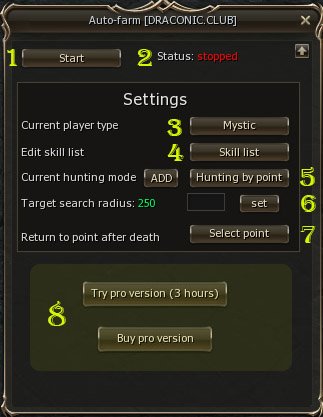 Day Time — a daily time allowance that is automatically refreshed every day.A global option has been added to Auto-Farm that disables attacks on Champion monsters. This feature also works outside Auto-Farm mode during regular hunting with multi-target attacks.
- 1. Start / Stop Auto-Farm.
- 2. Displays the current Auto-Farm status.
- 3. Switches the Auto-Farm behavior for Fighter and Mystic classes.
- 4. Skill configuration: Attack, Debuff, Buff, Toggle.
- 5. Switches hunting modes: Hunting by radius, Free hunting, Hunting by point (up to 10 points).
- 6. Sets the target search radius (minimum — 250, maximum — 2000).
- 7. After death, returns the character to the selected Personal Point, previously created via Alt+B.
- 8. Purchase the Pro Version (donation required), which increases your Day Time limit.
- Hunting by point and Return to point after death are available only in the Pro Version.
Video Overview